RetroGameGirl
Rebooting the past, one byte at a time.
devCMDcycle 2.19
devCMDcycle is a graphical front-end that simplifies the often complex command-line process of building and testing Atari 7800 ROMs. Written in Python, it’s a portable, lightweight tool for retro game developers.
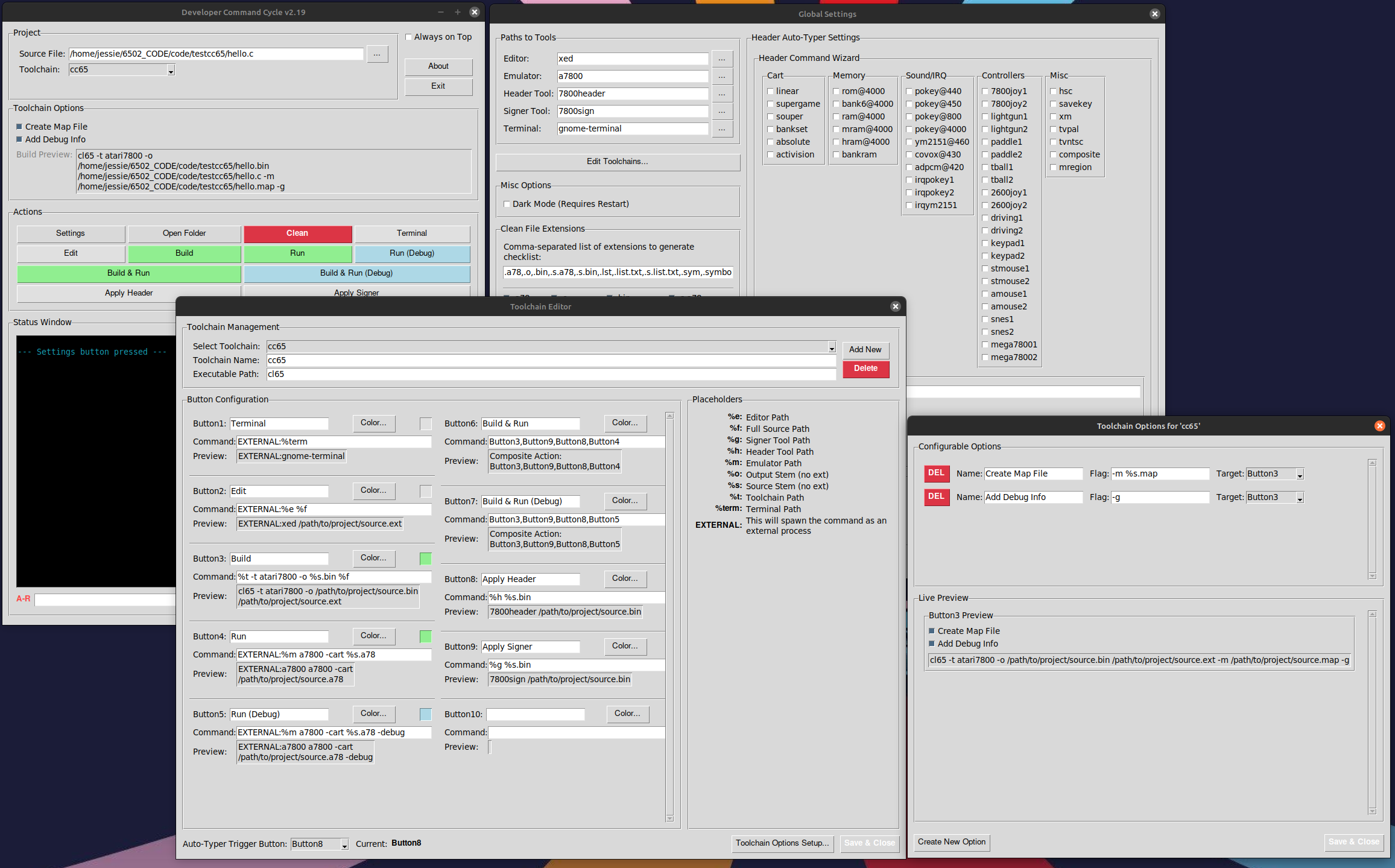
devCMDcycle is a graphical front-end that simplifies the often complex command-line process of building and testing Atari 7800 ROMs or any other command line development environment. Written in Python, it’s a portable, lightweight tool for retro game developers.
Download & Source
Click the links below to download the latest version or view the full source code on GitHub.
How It Works
1. Select Your Project
From the main window, simply choose your primary source file and the appropriate toolchain (e.g., `7800ASMDevKit` or `cc65`).
2. Define Your Actions
Use the built-in editors to configure buttons for tasks like Build, Run, and Clean. Use placeholders like `%t` (toolchain path) or `%f` (full file path) to make commands portable.
3. Build & Run
Click a single button to execute a full build process. Watch the output in the status window, and your ROM will be ready to play in the emulator of your choice.
User Manual
Click to Expand User Manual
Developer Command Cycle v2.19 – User Manual
Author: RetroGameGirl (v2.19)
1. INTRODUCTION
Welcome to the Developer Command Cycle.
First: Use at your own risk. See the license information at the bottom of this manual. There may be mistakes in this code; I know there are absolutely dead functions as I spaghetti strung it together, I did learn to code using 8-bit basic on a trash-80.
I prefer coding in a standard text editor and found that a lot of the modern IDE plugins for Atari development were more complex than I needed. This script started as my personal build process and has evolved into something worth sharing.
It’s been primarily tested on *nix-based systems, but it should be portable enough to work on other platforms.
This application is designed to be run from the command line within your project’s directory. For easier access, you can add the script’s location to your system’s PATH. To begin, simply select your main source file and the appropriate toolchain. If your toolchain is missing, you can configure it easily. The recommended way to add a new toolchain is through the ‘Settings’ menu, which will safely update the configuration file. As an alternative for advanced users, new toolchains can be defined directly within the DEFAULT_CONFIG section of the script.
Requirements:
Python Environment:
- Python 3.x: The script uses modern syntax like f-strings, so a recent version of Python 3 is required.
- Tkinter: This is the library used for the GUI. It’s included with most Python installs on Windows and macOS, but on Linux, you may need to install it separately (e.g., sudo apt-get install python3-tk).
Operating System:
- The script is designed to be cross-platform (Windows, macOS, Linux). However, it performs best on Linux or macOS because it uses the pty module for cleaner interactive terminal control, which isn’t available on Windows. It will still function on Windows, but the console behavior might differ slightly.
External Atari 7800 Tools:
- 7800asm: The assembler for your .s or .asm source files.
- cc65 toolchain: Specifically, the cl65 compiler for C projects.
- 7800header: Utility to add the required header to your ROM.
- 7800sign: Utility to sign your ROM, typically used with cc65.
- An Atari 7800 Emulator: The default is a7800, but this can be configured to use MAME or another emulator.
- A Text Editor: Your preferred editor for writing code (defaults to xed).
What It Does:
This tool is a graphical front-end for the common command-line utilities such as those used in Atari 7800 development. The goal is to simplify the workflow, allowing you to build ROMs and launch them in an emulator with a few clicks instead of typing out commands for each step of the process.
License & Disclaimer
This program is free software: you can redistribute it and/or modify it under the terms of the GNU General Public License as published by the Free Software Foundation, either version 3 of the License, or (at your option) any later version. This program is distributed in the hope that it will be useful, but WITHOUT ANY WARRANTY.
See the full GPL v3 license for more details.
Copyright (C) 2025 RetroGameGirl. All rights reserved.
 technomagick.net
Leave a comment